private client site
Case study
Premises Liability Expert.
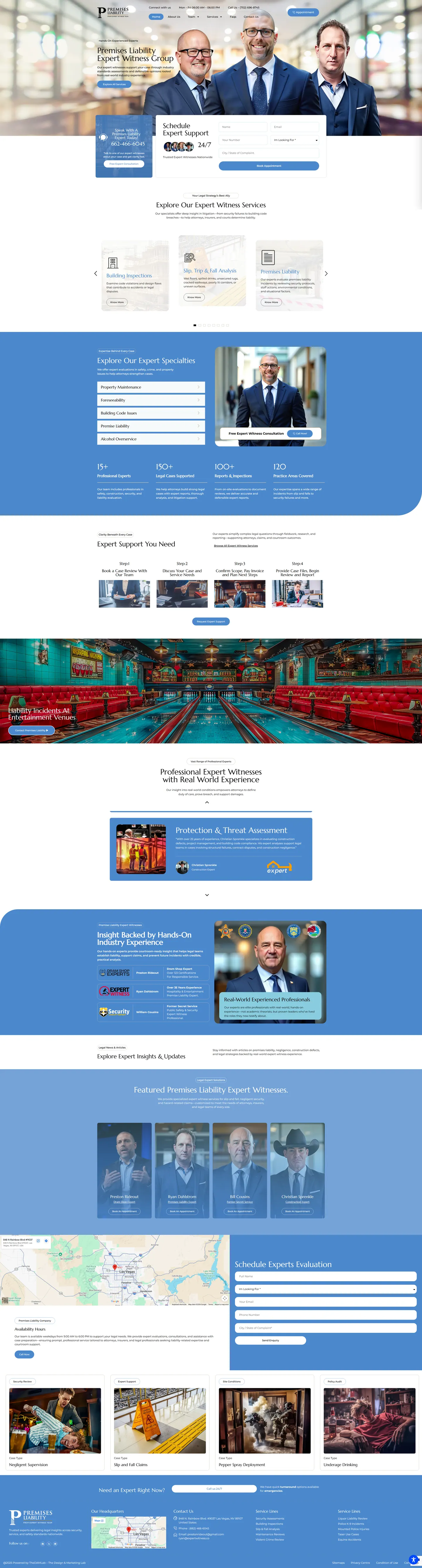
Lawyers handling premises claims want to see the experts and understand the engagement before handing over a case. I built a booking-led site with the experts in the hero, a numbered process from review to report and a request form on every key screen.
IndustryExpert Witness
Timeline2025
 HOVER TO SCROLL

// how it was built
From brief to launch.
Attorneys weigh process as much as credentials, so I built this site in stages that answered each question a lawyer asks before booking.
-
01 discover
What lawyers ask first
I listed the questions an attorney raises before hiring: who the experts are, what happens next, when to pay and how files move.
-
02 plan
Request at both ends
I placed one booking form at the top and a second beside the headquarters map, with the numbered engagement path between them.
-
03 design
Pale blue case panels
I chose scene-setting photos for each incident type and set them on soft blue rounded panels rather than courtroom imagery.
-
04 build
Forms and profiles
I built both forms with a service dropdown and a complaint location field, and added an appointment button to every expert card.
-
05 optimise
Mobile request first
On phones I moved the request form ahead of all service content so a lawyer can act immediately.
-
06 ✓ shipped
Case gallery and hours
I checked both forms, the case gallery covering issues like negligent supervision and the weekday hours beside the Las Vegas map.
What I did
The build, step by step.
- Faces in the first frame. The experts appear in the opening banner next to a request card that promises a reply at any hour.
- The engagement, step by step. A numbered path shows what follows a request, from the case review and scope agreement to invoicing, file transfer and the report.
- Scenes instead of clichés. Case categories use situational photos like a bowling lane, a wet floor sign and a bar, each framed in soft blue with rounded corners.
- Two forms, one purpose. Booking forms at the top and beside the office map both ask which service is needed and where the complaint arose.
- A button on every expert. Each featured profile card carries its own appointment link, so a lawyer can book the person they want.
Related work
See them all
More Expert Witness projects.
private client site
private client site
Want this for your business?
Send me your URL and I'll reply with a prioritised breakdown of what's costing you enquiries and how I'd fix it. No charge, and no call needed.